Live streaming of games has long ceased to be just entertainment. Today it is a full-fledged way to express yourself, communicate and even earn money. More and more people are thinking about trying their hand at being a streamer, but they often stop at the preparation stage: it seems that expensive equipment or special skills are needed. In fact, you can start streaming much easier if you approach it step by step.
Below I have collected tips that will help beginners confidently launch their first stream, avoid common mistakes and build a foundation for further development.
Preparing for your first stream: hardware and software
Before you go on air, you need to think about how viewers will see your stream. Here everything depends not so much on budget as on attention to detail.
Hardware:
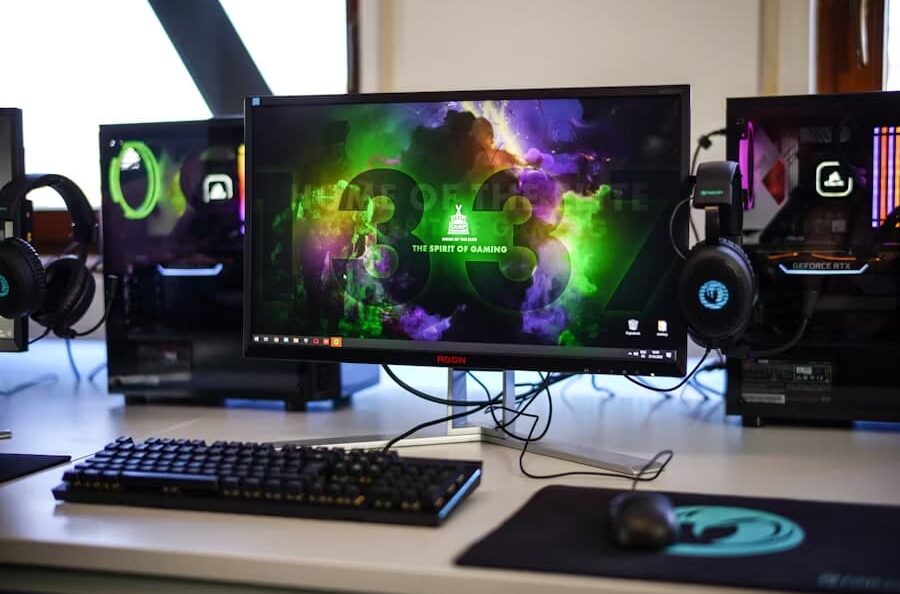
- PC or console. If you plan on gaming and streaming on your PC at the same time, it’s important to make sure your processor and graphics card can handle the double load. Modern consoles like PlayStation and Xbox make it easy – they allow you to launch streams directly from your device – but you’re better off using a PC for flexibility and customization.
- Camera. Even a simple webcam will do for starters. The main thing is a stable image without strong noise. If you want to immediately improve the quality, pay attention to cameras with support for 1080p at 60 frames per second.
- Microphone. Clear sound is key to a comfortable viewing experience. Even if you have a great picture but viewers can’t hear speech well, they’ll walk away. USB microphones like Fifine or Blue Snowball, which are inexpensive but sound decent, are good for beginners.
- Lighting. Many people ignore this point, but for nothing. Even a simple lamp aimed at the face makes the picture more pleasant. If possible, buy a ring lamp
Programs: The main tool of a streamer is a broadcasting program. The most popular ones are:
- OBS Studio – free, functional, supports plug-ins.
- Streamlabs Desktop – more friendly for beginners, but heavier on the system.
- XSplit – an alternative with a simple interface, but some of the features are paid.
These programs allow you to create “scenes”: for example, a screen with a game, a screen with a camera and chat, or a separate screen for “breaks”.
Tip: set up a test scene and do a test recording-stream for yourself to make sure the sound and picture meet your expectations.
First steps: launching the broadcast
The moment of the first broadcast seems scary, but in reality everything is easier than it seems. It is important to prepare mentally and technically.
- Step 1: setting up the scene.
In OBS or other program add sources – game, camera, microphone. Make sure that all windows are displayed correctly and the sound does not interrupt each other. - Step 2: Connect to the platform.
Choose where you will stream: Twitch, YouTube Gaming, Trovo or Kick. Each platform gives you a “broadcast key”, which you need to insert into the program settings. - Step 3: quality check.
It’s best not to go public right away. Do a test run in private mode or set up the stream as “access by link”. This way you will see if there are no lags and if you can be heard. - Step 4: start the broadcast.
Start by saying hello. Introduce yourself, tell them what you’re going to play, and don’t be shy to chat a bit. Even if you don’t have many spectators yet, act like there are dozens of people watching – it will help you get used to the format.
How to keep the audience’s attention
The biggest mistake beginners make is thinking that all they have to do is just play and the viewers will come. In reality, streaming is built around personality, atmosphere and interaction.
- Be yourself.
Don’t try to copy popular streamers. People come not only for the game, but also for your personality. Speak the way you are comfortable, make jokes the way you are comfortable with. - Regularity.
Make a schedule. Make it only twice a week, but at the same time. That way, viewers get used to it and know when to expect you. - Interactivity.
Read the chat, ask questions, engage your audience. For example: “Which option do you think I should choose?” or “Who has played this game, give me a hint”. Even small interactions keep people engaged longer. - Visual style.
Formatting plays a role. Simple free overlays can be found online or you can make your own. Add a “coming soon” and “break” screen – it makes it look professional.
Example: many viewers stay for the atmosphere. Even if the game is uninteresting, they will sit if they are comfortable with you in chat.
Beginners’ mistakes and how to avoid them
Every beginner streamer faces difficulties. The main thing is not to be afraid and learn from mistakes.
- Problems with sound. Often the microphone is too quiet or on the contrary “shouts”. Solution: adjust the level in the program, use noise reduction filters.
- Lags and low quality. If viewers complain about lags, reduce bitrate or resolution. Sometimes it is better to stream in 720p, but without lags.
- Ignoring chat. Even with 2-3 viewers try to respond. It’s important for people to feel like they’re being noticed.
- Lack of a schedule. Without a schedule, it is difficult to gather an audience. It’s better to announce, “Streaming every Wednesday and Saturday night” than to go on the air chaotically.
- Nervousness. The first stream may feel like a failure. That’s normal. Most viewers understand that you are new and will support you.
Channel growth and development
When the first streamings are behind us, the question arises: “What’s next?” This is where the work for the future begins.
Monetization.
Earnings do not come immediately, but there are different ways: donations, subscriptions to Twitch or YouTube, advertising, sponsorship. Some streamers sell merch – t-shirts, mugs, stickers.
Collaborations.
Collaborative streaming with other beginners helps to swap audiences. You can play cooperative games or set up collaborative Challenges.
Statistics.
Every platform has analytics: average viewers, peak activity, retention. These numbers show which games and formats are coming in better.
Constant development.
Improve the channel design, experiment with game genres, try new formats: conversational streams, reactions, Challenges.
The main thing: don’t expect quick results. Audience growth is a gradual process. The most valuable thing in the beginning is the pleasure of the process itself.